To organize a home poker tournament smoothly, decide the entry rules, blind schedule, breaks, and payout structure before play; record every player and re-entry when money is collected; run one visible clock; and reconcile the prize pool with the final payouts before settling the event.
A notes app can store a list of names, but it does not behave like a tournament. It cannot tell whether a number is an entry or a payout, keep the blind clock aligned with the schedule, update the prize table after a re-entry, or show which players still need a result. Pair it with a separate timer and the host now has two sources of truth to maintain while running the room.
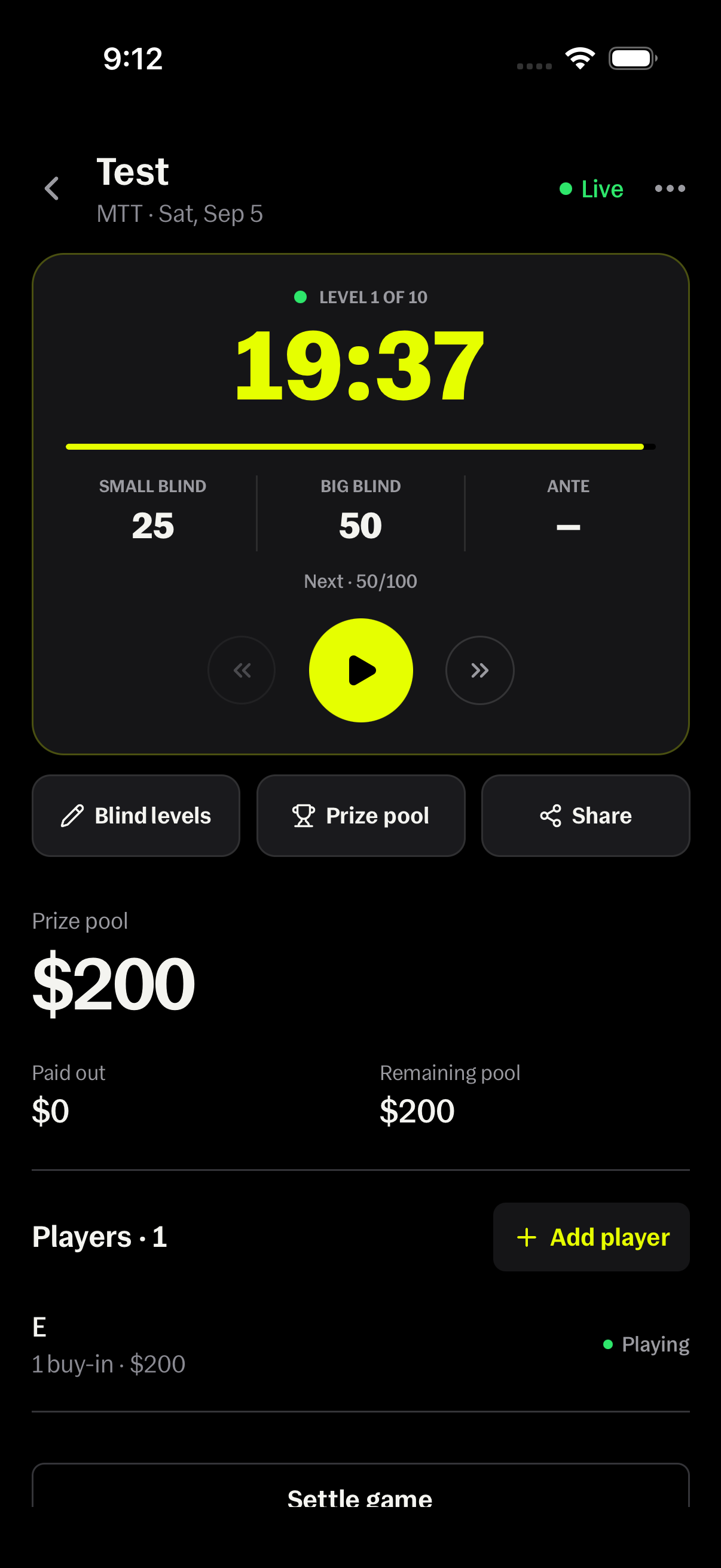
Tells Organizer connects those jobs in one tournament record. The current MTT screen brings the live level, time remaining, blinds, next level, prize pool, player list, and settlement status together. The host still controls the game and verifies the money; the app supplies a structure that is much easier to check than a late-night note.
Why do notes apps get messy during a poker tournament?
Traditional notes are free-form while a tournament is stateful. A line such as “Maya 40 + 40” might mean a re-entry was paid, promised, or merely discussed. An amount written beside an eliminated player might be a payout or the player's total entries. The host has to remember the meaning of every edit instead of reading it from the record.
A separate timer creates another failure point. If someone pauses the timer but not the written schedule, skips a level, extends a break, or changes the blinds, the note and the clock can disagree. Players then ask the host for the current blinds, the next level, and the time remaining while the host is also handling entries and chips.
The hardest errors appear after registration closes. One missed re-entry changes the prize pool, every percentage-based payout amount, and the final reconciliation. A note can hold all those revised numbers, but it cannot reliably show which downstream totals should have changed with them.
What should a tournament organizer decide before the first hand?
Write the operating rules before players arrive: starting entry, starting stack, whether re-entries are allowed, the registration cutoff, level duration, blind progression, breaks, and the payout policy. Clear rules reduce on-the-fly decisions that can feel inconsistent once money and elimination are involved.
Create the tournament in Tells under Ledger, Hosted games, then Host a game and MTT. Give it a recognizable name and review the blind levels before starting the clock. Each playing level can include a small blind, big blind, ante, and duration, while breaks belong in the same ordered structure.
Choose one person to own the organizer record. Other people can help seat players, color up chips, or announce levels, but one record keeper should enter all money and status changes. That prevents two partial lists from being merged after the final hand.
How should you track entries and re-entries?
Add each player when the entry is collected, not when you remember it later. If the tournament allows another entry, record it when the new stack is issued. Keeping the buy-in count and total buy-in on the player's row makes a repeat entry visible without turning the player's name into a handwritten equation.
Use the player list as a registration check. At the cutoff, compare the players in the room, the stacks issued, and the entries shown in the organizer. Resolve missing or duplicate entries before announcing the final prize pool, when the trail is still fresh.
Do not use a payout field to represent a bust before the player's run is actually over. Status and money answer different questions: who is still playing, how many entries were collected, and what each finisher receives. Tells keeps those parts attached to the same player without collapsing them into one ambiguous number.
How do you keep the blind schedule and live clock together?
Review the full structure before play, including antes and breaks. Once the tournament begins, the Tells clock shows the current level, time remaining, current small and big blind, and the next level. The host can start or pause the clock and move backward or forward when a correction is needed.
This connection matters because the timer is not just a countdown. It carries the context players need for the next hand. A generic phone timer can ring after 20 minutes, but it does not inherently know whether the next state is 50/100, a break, or a level with an ante.
Announce changes from the same screen that controls them. If the room pauses for a ruling or table move, pause the tournament clock there. When play resumes, everyone is looking at the same remaining time and blind state instead of estimating from a second device.
How can players follow the tournament without texting the host?
Use Share on the tournament screen to create a read-only live view. Viewers can see the timer, levels, and payout table without receiving controls that could alter the event. That gives the room a common reference and reduces repeated questions about the clock or prize structure.
Player-level results are a separate sharing choice. Decide whether the group should see entries and results before distributing the link, particularly if it might travel beyond the table. The useful default is to share only what the event needs, then keep editing authority with the host.
How should a home tournament prize pool be calculated?
The prize pool is the sum of all recorded entries and re-entries. After registration closes, compare that total with the money collected. Then choose a payout preset or enter manual percentages. A manual payout plan should assign a positive share to every paid place and total exactly 100 percent.
For example, 16 players enter for $40 and three re-entries occur. Nineteen entries produce a $760 prize pool. A 50/30/20 three-place structure pays $380, $228, and $152. Those amounts total $760, so the payout plan accounts for the full pool.
If a late re-entry was omitted, the organizer would show $720 instead. Correcting the entry raises the prize pool by $40 and updates the percentage-based amounts from the same underlying record. That is the advantage of connected data: the host corrects the cause instead of manually editing four separate totals in a note.
What should happen when a player is eliminated?
Update the player's result while the elimination is clear. A player who finishes outside the money receives a zero payout; a paid finisher receives the amount actually awarded. Recording results as the field closes leaves fewer unresolved names after the final hand.
The Organizer shows the prize pool, amount paid out, remaining pool, and players without a recorded payout. Those figures turn “Are we done?” into a checkable question. A remaining balance or open player is a prompt to investigate, not an amount to hide so the game looks complete.
How do you settle a poker tournament correctly?
Before settling, confirm every entry and re-entry, every eliminated player's result, and every paid finisher's payout. The combined payouts should equal the recorded prize pool. If they do not, check the entry count, payout amounts, and any player still marked as playing.
Tells warns when players have no payout recorded. Settling with open players marks them as busted with a zero payout, so use that option only after confirming those results are genuinely zero. A confirmation step prevents an accidental close, but it cannot make incorrect accounting correct.
Once the totals match, settle the game and keep the closed record as the event history. Tells records the tournament accounting; it does not transfer money or replace the laws, venue rules, or house rules that apply to your game.
A simple tournament run-of-show for the host
Before play: create the MTT, review levels and breaks, choose the payout policy, and add arriving players. During registration: record every entry immediately and keep the live clock on the shared structure. At the cutoff: verify the field and money, then announce the final prize pool and payout table.
During eliminations: update each player's status and payout, including zero when appropriate. After the final hand: confirm the winners, compare paid out with the full prize pool, resolve every open player, and settle. Following the same sequence each time makes the organizer easier to operate and the result easier for the group to trust.
How does Tells help a tournament organizer stay organized?
Tells replaces the loose bundle of names, calculator totals, timer state, blind notes, and payout messages with one purpose-built workflow. The live tournament screen keeps Level, clock, blinds, next level, Blind levels, Prize pool, Share, players, and Settle game close together because those jobs affect one another throughout the event.
It is still important to verify what is entered. Software cannot know that someone handed over cash without a recorded re-entry or that a physical chip stack was counted incorrectly. What it can do is preserve the relationship between each entry, the total pool, each payout, and the remaining balance so the host knows exactly where to look.
Frequently asked questions
What should I track when organizing a home poker tournament?
Track every player, entry and re-entry, player status, blind level, ante, level duration, breaks, prize-pool total, payout structure, and each final payout.
Can I organize a poker tournament with a notes app?
You can, but a note requires the host to interpret every number and manually keep entries, timer state, blind changes, prize calculations, and player results consistent. A purpose-built organizer connects those records.
Can players see the Tells tournament clock from their phones?
Yes. The host can share a read-only live view of the timer, blind levels, and payout table while keeping tournament controls private.
Does Tells collect entries or pay tournament winners?
No. Tells Organizer records entries, the prize pool, payouts, and settlement. The host remains responsible for collecting, safeguarding, and distributing the money.